
Spend Mapping Rules
How invoice line items are classified into emission categories.
1. Summary
Turning a line of spending into an emissions figure happens in two steps. First we work out what the spending actually is — cloud hosting, road freight, electricity, and so on. Then we take that answer, together with any quantity on the line, and pick the right emission factor for it.
This page covers the first step: how a supplier name, a description, an accounting code or a product code becomes a category. It follows a fixed order every time, so the same line always gets the same answer. An AI is only ever asked as a last resort — when every fixed rule has failed — and even then it only suggests. A person confirms it.
2. Classification precedence
We work down the list below, and the first thing that matches wins. Anything further down is not consulted.
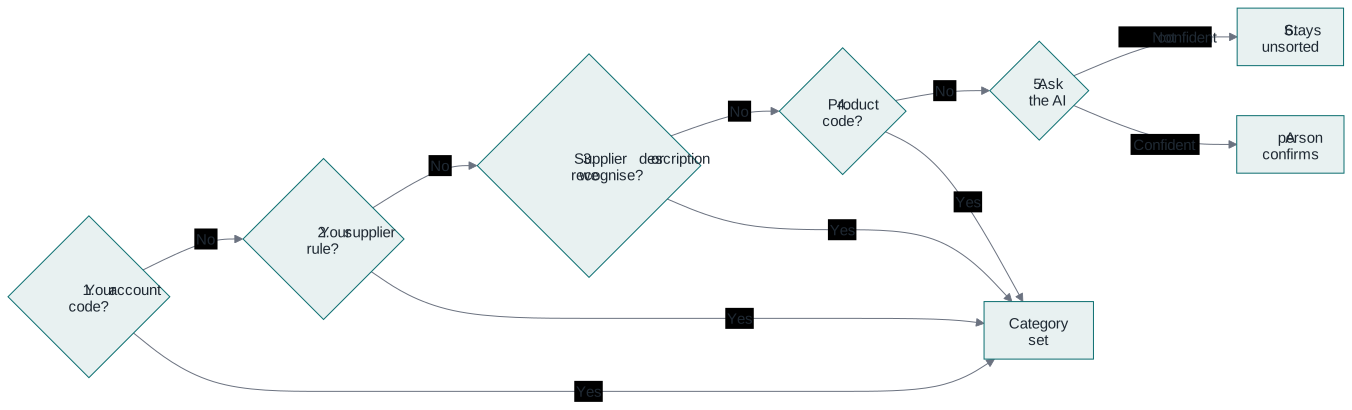
The table below gives the same order, with what each one looks at.
| Order | What we check | What it looks at | Who it applies to |
|---|---|---|---|
| 1 | Your own accounting codes | The account codes from your books, either exactly or by a range | Just your company |
| 2 | Supplier rules you have set | A category your company admin has set for a particular supplier | Just your company |
| 3 | Suppliers we already recognise | Wording we know belongs to well-known companies and types of spending — travel, freight, utilities, cloud services | All customers |
| 4 | Standard product codes | UNSPSC codes, if your accounting system produces them | All customers, plus any you have added |
| 5 | Ask an AI | Only used when steps 1 to 4 have all found nothing | A suggestion only, confirmed by a person |
| 6 | Nothing matched | The line stays unsorted and goes to a person to look at | — |
As soon as one of these sets a category, we stop. Nothing further down the list gets a say on that line.
2.1 General ledger rules
The strongest clue is your own bookkeeping. If a line carries an account code that you have already linked to a category, we use that straight away. You can link one exact code, or a whole range of codes in one go. This is the most reliable source we have, because your own accountant has already decided what the spending is.
2.2 Supplier overrides
Your company admin can set a rule that says a particular supplier always belongs to a certain category. We then apply it automatically to that supplier's future lines. Corrections made while reviewing lines do not create these rules — they help the platform learn instead, as explained in section 4.
2.3 Built-in supplier patterns
We keep a list of wording that identifies common suppliers and types of spending — airlines, couriers, energy companies, the big cloud providers. We match on whole words, so part of a word appearing by chance inside a longer one will not trigger a false match.
2.4 Commodity code mappings
Some accounting systems tag each line with a UNSPSC code — an international numbering system for products and services. Where a line has one, we use it, and a more specific code always beats a broader one. These come partly from a shared list and partly from any mappings you have added yourself.
2.5 Language-model fallback
If, and only if, all the fixed rules have failed to sort a line, we may ask an AI for a suggestion. We keep this deliberately narrow:
- It has to pick from a fixed list of categories. It cannot invent a new one.
- It reads the description of what was bought, not the supplier name — so a company called "Azure Interior" is not mistaken for a cloud provider.
- Every suggestion comes with a confidence score. We only use a category suggestion at 0.60 or above, and a factor suggestion at 0.70 or above.
- Those cut-offs include the number itself, so a suggestion sitting exactly on the line is used.
- Below the cut-off, we still record the suggestion and its score for the audit trail, but we do not act on it. The line stays unsorted and waits for a person.
- Before any text is sent, personal and financial details are automatically detected and stripped out of it.
- The AI only fills in a suggestion on the review screen. Someone at your company confirms or changes it before it affects any figure.
3. From category to emission factor
Once a line item has a category, we pick the emission factor using our three tiers:
- Gold — a CO₂e figure from the supplier is used exactly as given, with no factor needed at all.
- Silver — a quantity and unit (kWh, litres, kg, km) picks a factor based on actual usage.
- Bronze — the amount spent alone picks an average factor for that type of spending.
The category worked out on this page is what decides the factor for Silver and Bronze lines. The data behind every factor is described in the Emission Factor Dictionary.
4. Review and audit
- We never calculate emissions from an automatic sorting on its own — only lines a person has approved are calculated.
- Every correction someone makes is saved in the audit trail, so you can always see how any line ended up where it did. When a correction changes a line's category, the platform also learns from it, as long as the line has a description, the new category is not "unsorted", and the category actually changed. Corrections to other details, such as an amount or a supplier name, are saved in the audit trail but do not teach the platform anything.
- The rules themselves are version-controlled, which means the way we sorted your spending can be reproduced exactly, even years later.
5. Worked examples
| The line | What decided it | Category |
|---|---|---|
| Account code 7200, supplier "British Gas" | Your own account code if you have set one up, otherwise a supplier we recognise | Electricity or natural gas |
| "DHL Express international shipment" | A supplier we recognise | Air or road freight, depending on the wording |
| UNSPSC 43201800, "laptop computers" | The standard product code | IT hardware |
| "Consultancy retainer, June" | Nothing matched, so the AI suggested and a person confirmed | Professional services |
| "Misc. sundry" | Nothing matched at all | Unsorted — sent to a person to look at |